A living guide, updated as tools change
In this guide
- Chapter 1: What your newsletter is actually for
- Chapter 2: The smallest setup that works
- Chapter 3: The welcome sequence, your first little story
- Chapter 4: Getting readers in the door
- Chapter 5: What to send between books
- Chapter 6: Launch mode
- Chapter 7: The tool map: What talks to what
- Chapter 8: Write once, publish everywhere
- Chapter 9: Keeping your list healthy
Before we start: A confession
You can set up every single thing in this guide yourself. No developer, no marketing degree, no secret handshake. That’s the first thing I want you to know.
The second thing: I know this because I did it, and then I let it all fall asleep.
When I published my urban fantasy novel Nightmare City in 2019, I did everything the guides told me to. A free prequel novella to lure readers in. BookFunnel to deliver it. MailerLite to catch the email addresses. Welcome sequences, automations, the works. Readers signed up. Quite a few of them, actually.
And then I didn’t write to them. For years.
Not because the tech failed. The tech was fine. I just never understood what the newsletter was for between books, and I didn’t know what to write about. Every time I sat down to write one, I stared at a blank page and a lot of buttons to press. So I pressed none.
we’ve all been there. Some of us live there.
This guide is the one I wish I’d had. It starts with the smallest setup that actually works, walks you through the welcome sequence step by step, and then builds outward, one piece at a time, until your newsletter, your free book, your blog and your social media all talk to each other.
How to use this guide
- Starting from zero? Read it front to back. Each chapter builds on the one before.
- Already have a list, maybe a sleepy one? Each chapter opens with a short “Already have this?” box. Skip what works, fix what doesn’t.
- Just here for the tool map? Jump to Chapter 7. I won’t be offended.
This is a living guide. Tools change, prices change, I learn things. The date at the top tells you when it was last updated, and the log at the very end tells you what changed.
Chapter 1: What your newsletter is actually for
Your newsletter has one job: keeping readers close between books, so they’re still there when the next one comes out. Everything else in this guide serves that job.
That sounds obvious. It wasn’t to me. I treated my newsletter like a megaphone I’d pick up on launch day. But a megaphone you haven’t used in two years mostly gets you “who’s this again?” and an unsubscribe.
The three things a good author newsletter does
- It keeps the relationship warm. Readers signed up for you and your world, not for a catalogue. Between releases, you give them a reason to open your emails: a story behind the story, a character secret, a peek at your desk.
- It sells the next book to people who already want it. On launch day, your list is the one audience no algorithm can hide from you. Social media decides who sees your post. Your newsletter goes to everyone who asked for it.
- It moves readers through your series. Someone who loved book one gets told, at the right moment, that book two exists. Sounds basic. Happens surprisingly rarely.
your list is the only audience you actually own.
Why a “normal” newsletter playbook doesn’t fit
Most email marketing advice is written for shops. Shops have something new to sell every week, so their emails are mostly offers: discounts, flash sales, “you left something in your cart”.
You release one to three books a year, maybe. If every email is a sales pitch, you’ll have nothing to say for months, and your readers will learn to skip you. An author newsletter runs on relationship content most of the year and switches to launch mode for a few weeks around each release. We’ll build both.
| A shop newsletter | An author newsletter |
|---|---|
| Something new to sell every week | One to three releases a year |
| Discounts and offers | Stories, secrets, behind the scenes |
| One store, one checkout | Readers loyal to Kindle, Kobo, Apple, their library |
| Every subscriber is a buyer | Many start with a free book and become buyers later |
| Success = sales this week | Success = read-through, launch day, replies from fans |
Already have a list? Ask yourself one question before reading on: if you sent an email tomorrow, would your readers remember who you are? If the honest answer is “probably not”, don’t panic. There’s a wake-up plan for exactly that.
Chapter 2: The smallest setup that works
The smallest newsletter setup that works has three parts: an email platform, a sign-up form, and a welcome email. You can have all three running this weekend, for free.
Everything else (free books, blogs, social media, automations) plugs into these three later. Don’t build the extension before the house.
yes, I tried to build the extension first. Learn from me.
Part 1: An email platform
This is the service that stores your subscribers’ addresses and sends your emails. Never send a newsletter from your normal Gmail or Outlook: you’ll hit sending limits, land in spam, and break privacy rules without noticing.
Two platforms come up again and again among indie authors. Here’s how their entry levels compare, checked on their own pricing pages:
| MailerLite | Kit (formerly ConvertKit) | |
|---|---|---|
| Free plan | Up to 250 subscribers, 2,500 emails a month | Up to 10,000 subscribers |
| Welcome sequences on the free plan | Yes, up to 3 automations | No, automations and sequences need a paid plan |
| Sign-up forms and landing pages, free | 3 forms, 1 landing page | Unlimited |
| First paid step | From $12 a month | Creator: $33 a month at 1,000 subscribers |
| Good fit if | You want automations from day one on a small budget | You expect a big list fast and are happy to pay once you automate |
Prices as of 10 Oct 2026: MailerLite pricing, Kit pricing. Both change their plans regularly, so check before you sign up.
Full disclosure: I use MailerLite for my own author list. I’m not paid to say that, and either one will do the job in this guide.
My honest pick for a fresh start: MailerLite’s free plan, because the welcome sequence is an automation, and Kit’s free plan doesn’t include those. When you outgrow 250 subscribers, that’s a good problem and a small bill.
Part 2: A sign-up form
Every platform lets you build a form and gives you a link to a hosted sign-up page. That link is all you need to start: put it in your social media bios, at the end of your books, in your email signature.
Turn on double opt-in while you’re there. New subscribers confirm their address with one click before they’re added. You’ll grow a little slower, but your list will be real people who actually want your emails, and that’s what keeps you out of spam folders.
Part 3: A welcome email
The moment someone signs up is the moment they’re most interested in you. Ever. Don’t let it go to waste with silence. At the very least, set up one automatic welcome email today. Next, we turn that one email into a small story.
Already have this? Check three things in five minutes:
- Does your form still work? Sign up with a second email address.
- Is double opt-in switched on?
- Does a welcome email actually arrive?
mine didn’t, the first time I checked after years.
Chapter 3: The welcome sequence, your first little story
A welcome sequence is a short series of emails that goes out automatically to every new subscriber. Write it once, and it greets every reader who ever joins, even while you sleep, write, or binge a TV show.
Most welcome sequences are a row of announcements: “Hi! Here’s my book! Here’s my other book! Follow me on Instagram!” Readers skim them and forget you.
But you’re a storyteller. You already know how to make someone turn the page. So build your welcome sequence like a tiny story with a beginning, a middle and a hook.
you’re in the “just one more chapter” business. Use it.
The five-email story arc
- The hello. Deliver what they signed up for (the free book, if there is one), say who you are in a few warm lines, and tell them what to expect from you.
- The story behind the story. Where the idea for your world or series came from. The weird dream, the road trip, the history rabbit hole.
- A secret. Something about a character or the world that isn’t in the book. A deleted scene, a backstory, a map. Readers love feeling like insiders.
- A question. Ask them something and invite them to hit reply: their favorite trope, which character they’d trust least, what they’re reading right now. Replies tell email providers that people want your emails, and they tell you who your readers are.
- The next step. Now, and only now, point them to book one (or the next book in the series), with links for every store they might use.
A spacing to start with: email 1 straight away, then roughly every two to three days. That’s a starting point, not a rule: test it and adjust.
How to tell if it’s working: most platforms show stats for every single email inside an automation. Look at where clicks and replies drop off: if lots of readers click in email 2 and almost nobody in email 4, email 4 is your weak spot. Rewrite it, move it, send it at a different time, or cut it. Treat open rates with caution, though.
How to set it up
The button names differ from platform to platform, but the steps are the same everywhere:
- Create a group (MailerLite) or tag (Kit) for new subscribers, for example “Welcome sequence”.
- Make sure your sign-up form adds people to that group or tag.
- Create a new automation that starts when someone joins that group or gets that tag.
- Add email 1, then a delay, then email 2, another delay, and so on.
- Send yourself a test, read every email on your phone, and click every link to make sure it leads where it’s supposed to.
- Switch the automation on. Then sign up with a second email address and watch it arrive for real.
everyone skips step 6. It’s the one that matters.
What it looks like in real life
Here’s the real first email of my own welcome sequence, the one every reader of Once Upon a Nightmare gets. Unedited, a little embarrassing, and very educational.
Before:
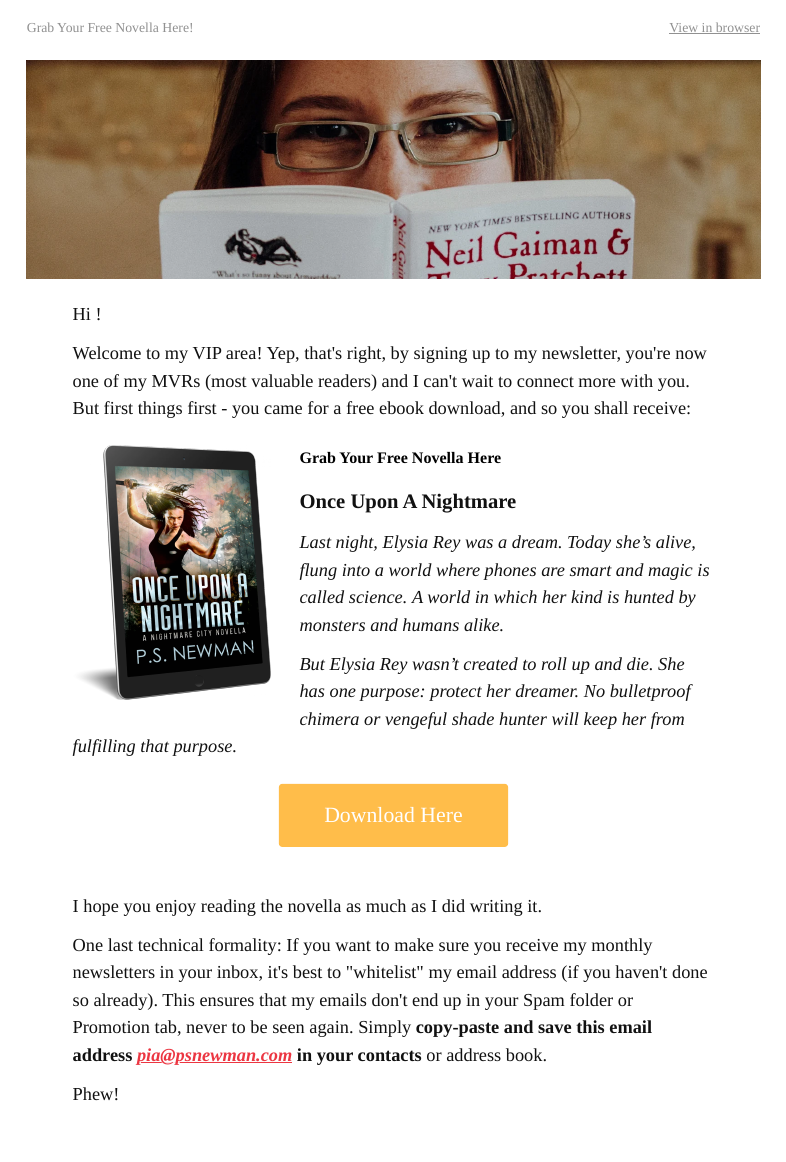
“Hi !” Hi who? Hi nobody.
What it gets right: the free book arrives straight away, with a cover, a blurb and one big button. That’s the most important job of email 1, and it does it.
What I’d change today:
- The empty greeting. The first-name field was blank, so every reader got “Hi !”. If you use a name field, always set a fallback, like “there”.
- The promise. “My monthly newsletters” is a promise. Only make the ones you’ll keep. (Ahem.)
- No actual hello. Readers learn they’re “MVRs”, but not who I am or what I write.
- Marketing-speak. “VIP area” and “most valuable readers” sound like a shop. My blurb voice is so much better than my sales voice.
- No reason to reply. A long, technical paragraph about whitelisting instead of one friendly question.
After: the same email, rewritten with the story arc from this chapter.
Subject: Your copy of Once Upon a Nightmare is here
Hi [first name, or “there”],
You asked for a nightmare, so here it is: [cover, blurb and a big Download Once Upon a Nightmare button]
A quick hello: I’m Pia, and I write urban fantasy as P.S. Newman. Expect monsters, magic, and heroines who weren’t created to roll over and die.
Over the next two weeks I’ll send you a few more emails: the story behind Nightmare City, a secret about Elysia that didn’t make it into the book, and a question I’d love your answer to.
One tiny favor: hit reply and tell me the last book that kept you up way too late. I read every answer.
Happy reading, Pia Word Juggler
P.S. Add pia@psnewman.com to your contacts, so I don’t get lost in your Promotions tab.
Shorter, warmer, and it sets up the next four emails like a table of contents. The whitelisting tip survives as a one-line P.S.
Already have a welcome sequence? Read it from start to finish as if you’d never heard of yourself. Does it tell a story, or just list things? Does it end by pointing to a book, with links that still work? If it’s older than your newest book, it’s out of date.
Chapter 4: Getting readers in the door
Readers join an author’s list for one of two reasons: they loved a book and want more, or you offered them something free and wonderful. The second one is called a reader magnet, and it’s the engine behind many author lists.
What makes a good reader magnet
- A prequel novella or short story set in your world. My own was Once Upon a Nightmare, a free prequel to Nightmare City.
- A bonus epilogue or deleted scene for readers who’ve already finished a book.
- Extras from the world: a character dossier, a map, the in-world newspaper, letters between two characters.
An idea I love. Ilona Andrews has a whole collection of texts between Kate, Curran and friends on their website, free to read and ridiculously fun. Imagine your two leads bickering over who forgot the milk, or your villain texting the wrong person. Bundle a few of those into a free download, and you have a reader magnet.
The best magnets lead straight into a book you sell. A prequel to book one is the classic for a reason.
“10% off” is not a reader magnet. A story is.
Where readers find it
- The back of every book. The moment a reader finishes is their peak “I want more” moment. Put your offer right after “The End”, before the acknowledgments.
- Your website, on the homepage and at the end of relevant blog posts.
- Your social media bios and the occasional post.
- Newsletter swaps and group promotions with other authors in your genre.
Delivering the free book
Sending an ebook file yourself sounds simple until readers email you because their Kindle won’t open it. Delivery services handle the file, the formats and the “help, it won’t download” questions for you.
| BookFunnel | StoryOrigin | |
|---|---|---|
| Entry plan | First-Time Author: $30 a year (500 downloads a month) | Basic: free |
| Mid plan | Mid-List Author: $20 a month or $200 a year (5,000 downloads a month) | Standard: $10 a month or $100 a year |
| Top plan | Bestseller: $30 a month or $300 a year (unlimited downloads) | Guided setup: price on request |
| Adds new readers to your list automatically | From Mid-List | Integration listed on both plans |
| Also does | Group promotions, ARC delivery, selling books directly | Newsletter swaps (Standard), review copies, writing goals |
Prices as of 10 Oct 2026: BookFunnel pricing, StoryOrigin pricing.
BookFunnel connects directly to nine email platforms, including MailerLite, Kit (still listed under its old name, ConvertKit), Mailchimp and AWeber (BookFunnel’s list). On its cheapest plan there’s no direct connection, but there’s a simple workaround: your own sign-up form adds the reader to your list, and your welcome email holds the BookFunnel download link. Works on every plan.
I use BookFunnel’s Mid-List plan for Once Upon a Nightmare.
Already have a reader magnet? Test the whole path once a year: download your own book from the back matter link, sign up as a stranger, and check that the welcome email arrives. Links rot, integrations break when platforms update, and nobody tells you.
Chapter 5: What to send between books
Between launches, your newsletter’s job is to be something readers look forward to, not something they tolerate. That means mostly stories, very little selling.
This is the chapter where my own newsletter died. Not for lack of tools. For lack of ideas. So here’s the list I wish I’d taped above my desk.
readers don’t need news. They need YOU.
Eight things to send when you “have nothing to say”
- A scene from a character’s point of view that isn’t in the book
- The real place, object or legend that inspired part of your world
- Your writing desk, as it really looks today
- A poll: which side character deserves their own story?
- A “behind the scenes” of a decision: why that character had to die
- A deleted scene, with a note on why it didn’t make the cut
- A letter or diary page written by one of your characters
- An honest update on the next book: the messy middle is interesting too
Want the full list? [Number] newsletter ideas for fiction authors, from in-world letters to reader polls, as a free download when you join my newsletter. [Button: Get the list]
How often?
Consistency matters more than frequency. Once a month, reliably, beats once a week for three weeks and then silence for a year (ask me how I know). Pick a rhythm you can actually keep, tell your readers what it is, and keep it.
The wake-up plan for a quiet list
If your list has been asleep for months or years, don’t suddenly blast everyone with a launch announcement. People who forgot you hit “spam”, and too many of those can push all your future emails into spam folders.
Wake it up gently instead:
- The honest hello. Tell them who you are, how they joined (“you downloaded my free prequel a while ago”), and admit you’ve been quiet. Humans forgive. They like honesty.
- A gift. Something free and new: a short story, a bonus scene, an early look at what’s coming.
- The “still want me?” email. A clear, friendly invitation to unsubscribe if they’ve moved on. It feels scary. It’s also the best thing you can do for your list.
- Clean up. Anyone who hasn’t opened any of those emails gets removed or moved to a separate group.
- Back to your rhythm. Now you’re writing to people who actually want to hear from you.
Already sending regularly? Look at your last five emails. If more than one of them was mainly “buy my book”, swap the next one for a story.
Chapter 6: Launch mode
Launch mode is the few weeks around a release when your newsletter switches from storytelling to a clear, friendly “it’s here, go get it”. Because you’ve been sending stories all year, your readers are warm and actually open these.
this is where all those “nothing to say” emails pay off.
A simple launch run
- Cover reveal. Readers love being first. Give your list the cover before social media sees it.
- Pre-order open (if you do pre-orders), with links for every store.
- A taste. The first chapter, or a scene that sets the mood.
- Release day. Short, joyful, all the store links, nothing else competing for the click.
- A gentle reminder a few days later, for everyone who meant to and forgot.
- The review ask. A week or two in, ask readers who’ve finished to leave a review. Reviews help the next reader decide.
Set these up as a separate automation or as scheduled campaigns, so launch week runs itself while you’re busy answering messages and refreshing your sales dashboard (we all do it).
Your list as your launch team
Your newsletter is also a good place to find ARC readers: subscribers who get an early copy in exchange for an honest review around release day. Invite them from your list, deliver the copies through a service like BookFunnel or StoryOrigin, and remind them gently as release day approaches.
Borrowing other authors’ readers
- Newsletter swaps: you feature another author’s book in your newsletter, they feature yours. Pick authors in your genre whose readers would love your books.
- Group promotions: many authors in one genre pool their free or discounted books on one page, and everyone shares it with their list. BookFunnel and StoryOrigin both run these.
Both bring in new readers who already love your genre, which is the best kind of new subscriber there is.
Already have a launch routine? Check your store links. Readers are loyal to their store: Kindle, Kobo, Apple Books, Barnes & Noble, Google Play, their library. A launch email with only an Amazon link quietly loses everyone else.
Chapter 7: The tool map: What talks to what
Every tool in this guide plugs into one thing: your email platform. Readers flow in from the left; your writing flows out on the right. If you remember nothing else, remember that the email platform is the hub.
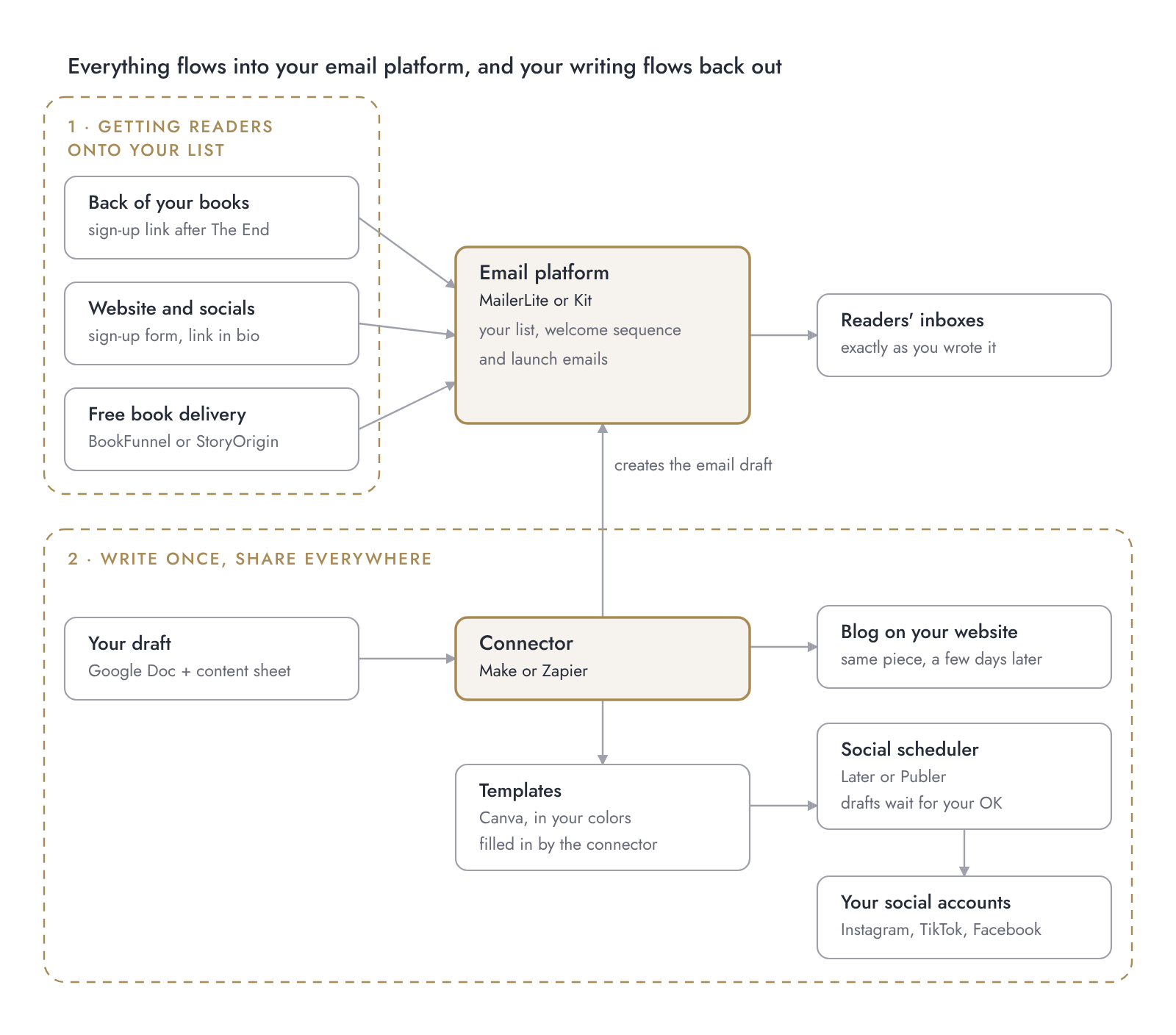
The top half is all about getting readers onto your list. The bottom half is about writing once and letting tools carry it to your blog and social media.
Which connections exist
| From | To | How |
|---|---|---|
| BookFunnel | MailerLite, Kit and 7 more | Direct integration, Mid-List plan and up |
| BookFunnel (any plan) | Any email platform | Your own form + download link in the welcome email |
| StoryOrigin | Your email platform | Integration listed on both plans; platforms not named on the pricing page |
| Make | Canva | Fills a design from a brand template (needs Canva Pro or higher) |
| Make | WordPress blog | Needs Make’s connector plugin on your site, so your website plan must allow plugins |
| Make or Zapier | MailerLite, Kit, Google Sheets, schedulers | Apps in their directories |
Tools add and drop integrations all the time. Before you build, search the connector’s app directory for each tool you use.
What’s a connector, exactly? A tool that passes things between your other apps, so you don’t have to copy and paste. You set up a recipe once (“when a row in my sheet says Ready, create an email draft”), and it quietly runs in the background from then on. Make and Zapier both offer AI steps too, like turning a newsletter into a short social caption. Handy, but optional: in this guide, AI never writes your newsletter, and every AI draft waits for your OK.
Just starting out? You don’t need the big map yet. This is all it takes to get going:
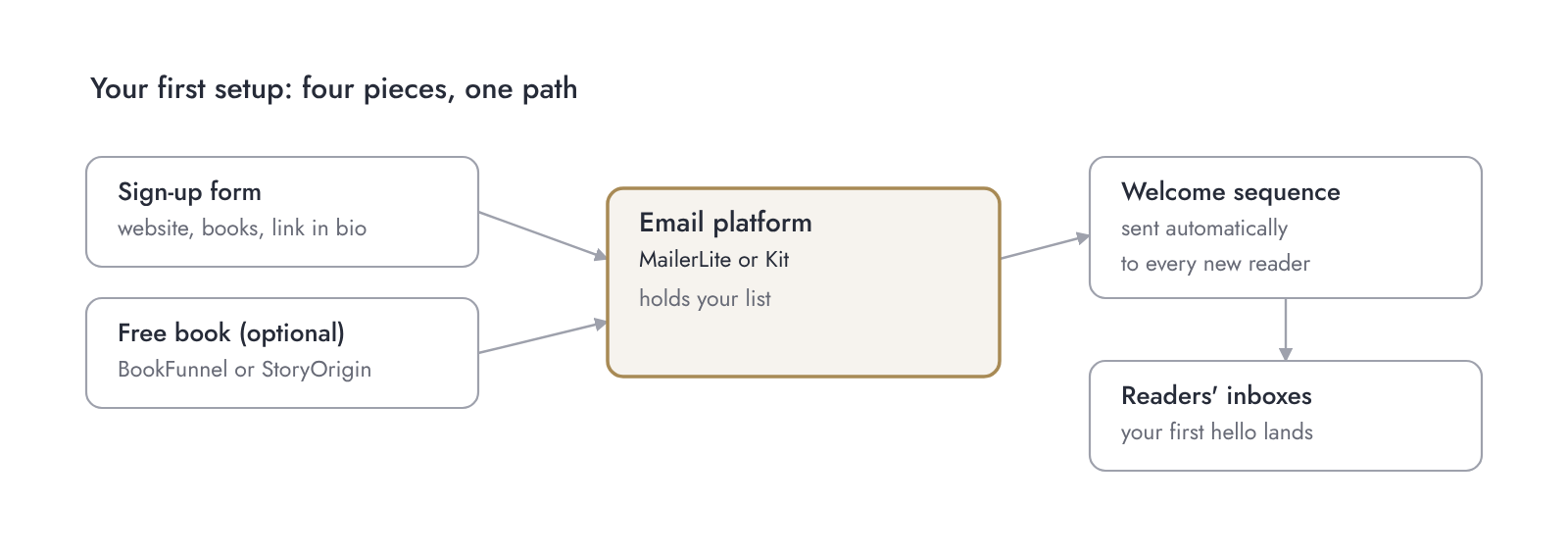
Get these four running first. Everything else on the big map can wait until they do.
Chapter 8: Write once, publish everywhere
Once your newsletter runs, the next level is making one piece of writing do three jobs: a newsletter issue, a blog post a few days later, and a handful of social posts. You write once; tools carry it the rest of the way.
this is the bit that gives you your evenings back.
Why newsletter first, blog second
Subscribers should get your stories first. That’s part of the deal, and it’s a nice reason to subscribe. A few days later, the same piece goes on your blog, where search engines and social media can send new readers your way, some of whom will subscribe. The circle closes.
The pieces you need
- A home for your drafts. A Google Doc per issue and one simple spreadsheet listing every issue with its status and dates. That sheet becomes your control centre.
- A connector. A tool that watches your sheet and moves things along when you mark an issue “ready”: into your email platform as a draft, onto your blog, into your social scheduler. Make and Zapier are the two big ones.
- A social scheduler. It holds your social posts as drafts until you approve them, then posts at the times you choose.
- Templates. One set of slide templates in your fonts and colors (Canva works well) turns a newsletter quote into an Instagram or TikTok carousel.
| Tool | Job | Free plan | First paid step |
|---|---|---|---|
| Make | Connects your apps | 1,000 credits a month, 2 active scenarios | Core: $12 a month |
| Publer | Social scheduler | 3 social accounts (not X), 10 scheduled posts per account at a time | Not shown on the page when checked |
| Later | Social scheduler | No free plan, 14-day trial | Starter: $18.75 a month, billed yearly |
| Canva | Social templates | Yes, but a connector can only fill your templates on Pro | Pro: $144 a year, free trial |
Prices as of 10 Oct 2026.
Where the human stays in the loop
Automation should do the carrying, never the talking. Your newsletter stays exactly as you wrote it. Social drafts wait in the scheduler until you’ve read, tweaked and approved them. Anything with your face, your voice or a trending sound stays yours to post by hand.
Can you build this yourself?
You can. Everything above is documented by the tools themselves, and their free plans are enough to test it. Expect a few evenings of setup and a couple of “why is nothing happening” moments.
Or you hand it to someone who builds these for a living. That’s literally what my Newsletter Highway is. No pressure either way: this guide works for both.
Already posting by hand everywhere? Start with one connection only: newsletter to blog. Once that runs smoothly, add the social drafts.
Chapter 9: Keeping your list healthy
A healthy list is a list of people who actually open your emails. A bigger list full of people who don’t is slower, more expensive, and worse for your deliverability, which is the fancy word for “do your emails land in the inbox or in spam”.
unsubscribes are not rejection. They’re housekeeping.
Three habits that keep a list healthy
- Clean out the sleepers. Every few months, find subscribers who haven’t opened anything in a long time. Send them one last “still want me?” email, then remove anyone who doesn’t respond. You can set this up as an automation, so you never have to remember.
- Make leaving easy. A clear unsubscribe link in every email. People who can’t find it click “spam” instead, and that hurts you.
- Watch your replies, not just your numbers. Open rates have become unreliable, because some email apps open emails automatically for privacy reasons. Replies and clicks tell you more about who’s really reading.
The privacy basics
I’m not a lawyer, and this isn’t legal advice. Rules depend on where you and your readers live, so check what applies to you. These basics are a good start almost everywhere:
What’s GDPR? The General Data Protection Regulation is the EU’s privacy law, in force since May 2018. It protects the personal data of people in the EU, and an email address counts. It generally applies to authors outside the EU too, as soon as you offer something like a newsletter to readers there. So if one reader in Germany or France joins your list, it’s your business. The UK has its own near-identical version, the UK GDPR. For a newsletter, it mostly comes down to the basics below: clear consent, a record of it, and an easy way out.
- Only add people who asked to be added. Never import contacts, conference business cards or your aunt’s address book.
- Use double opt-in, so you have a record that each person confirmed.
- Say what they’re signing up for, right on the form: “Stories, bonus scenes and book news, about once a month.”
- Include your sender details and an unsubscribe link in every email. Your platform’s footer usually handles both.
- Have a privacy policy on your website that explains what you do with email addresses.
Your sender address
Emails sent from your own domain (you@yourname.com) tend to look more trustworthy, to readers and to email providers, than a free Gmail address. Your email platform will walk you through “authenticating” your domain, a one-time setup that proves the emails really come from you.
Already have a big list? Before your next launch, do one clean-out. Fewer, warmer subscribers beat a large, cold list every time.
Where to go from here
You now know more about author newsletters than I did when I published my first book, and you can build every piece of it yourself. Start small: platform, form, welcome sequence. Then add one chapter at a time.
one email to one reader is already a newsletter.
Go deeper (coming soon)
Each chapter of this guide gets its own deep-dive post. As they go live, they’ll be linked here and in the chapter they belong to.
- Your welcome sequence as a story: a template for fiction authors (Chapter 3)
- 20 in-world things to send readers between books (Chapter 5)
- Newsletter first, blog second: the one-page workflow (Chapter 8)
- Waking up a sleepy list without landing in spam (Chapters 5 and 9)
- Launch week, run by your newsletter (Chapter 6)
Want it built for you?
If you’d rather write and let someone else handle the setup, that’s what I do at Behind Your Book. Book a free 30-minute intro call and tell me how your newsletter runs today.
And if this guide helped, join my newsletter. You’ll get every new deep-dive first, a few days before it appears here.
newsletter first, blog second. Obviously. 😉
Update log
| Date | What changed |
|---|---|
| [Publication date] | First version published |
Sources
Prices and plan details checked on 10 Oct 2026 on the tools’ own pages: MailerLite, Kit, BookFunnel, BookFunnel email integrations, StoryOrigin, Make, Later, Publer, Canva (checked 11 Oct).

